My Citi Hunt web app •UX/UI case study
Product Manager: Meredith Cohen
UX/ UI Designer: Marija Golubovic
Objective
My Citi Hunt is a product designed to offer a unique, personalized experience for the exploration of new places around the globe! This is not your random travel app. With My Citi Hunt, you get to discover places based on your interests and skip usual touristy sights.
Whether you’re traveling alone or with a group, you just need to choose a visiting city, enter the date and time for your adventure, choose from over 100 different topics of interest, and based on the inputs, the app generates a personalized scavenger hunt map with places to discover!
What are the benefits?
My Citi Hunt saves you time for sights research, and it’s available on the go
It offers a unique scavenger hunt experience for groups and solo travellers
It’s your pocket concierge service, available whenever you need it - online & offline
Current Pain Points
Creating a scavenger hunt game can be challenging for inexperienced users and especially without prior knowledge and experience.
Finding the places to visit and planning the sightseeing is time-consuming.
Popular touristic places are sometimes overrated, and travelers often miss unique local experiences.
Scavenger hunts are usually designed for active and outdoorsy people and are not suited for people with disabilities
When traveling with family or a group of friends, it’s challenging to plan exploration when you simply don’t share the same interests and expectations from your travel.
Competitive Analysis
Marketing Advantage
Personalization: Customized game based on users' preference
Availability: Every day of the year
Environment: Indoor & outdoor activities
Support: Company donates to charities
Key Objectives
Core messages “Wander With Purpose” and “Your Adventure Awaits.”
The best landmarks and hidden gems around the city
More than 100 roles available for players
No need for a spot reservation
Designed for all ages
Overall Strategy
The business of Let's Roam is designed to connect people around the globe and people around the specific user by offering over 200 hunts on three continents. What makes it unique is that every quest is designed for up to 10 users, and every person has a specific role, so there are no leaders; everybody is equally important.

Marketing Advantage
Calls for action: The first three games are for free
Availability: Invites users to create geocashes and find ones that are hidden locally
Editor's choice: Google Play Store Rating 4.7, App Store 4.5
Key Objectives
Invites users around the globe to go out and look for geocaches
Worldwide treasure hunt
Over a million geocache containers around the globe
Every container contains a secret treasure
Overall Strategy
Wherever a user is located, geocaches might be near. This global game of creating and hiding secret treasures inspires gamers to go on a hunt and explore the neighborhood.
Find more information about Competitor and SWOT analysis ➡️ here

User Research
Goal #1 Learn how participants prepare for their trips and how long it takes to plan them
Goal #2 Discover favorite activities participants prefer during their travel
Goal #3 Understand why people find scavenger hunts interesting
Goal #4 Learn what their expectations are of the scavenger hunt travel app
User interviews
Discovered behaviors & attitudes
For the research purpose, we interviewed 10 participants with different demographic and ethnographic backgrounds. All of them searched for scavenger hunt suggestions online at least once. They would usually download scavenger hunt maps on their phones or print out the maps. The majority of the interviewees expect the game lasts from 1 and up to 4 hours, or longer for larger groups, but with short breaks.
Needs & Expectations of the app
Test participants expressed their expectations from the scavenger hunt travel app:
The map needs to load quickly and must be available online & offline, reliable & efficient as Google maps
It should enable users to save or label visited locations
It should have a sight preview option to enable users to view how visiting sight look from the outside
It needs to provide an approximate time of commute & walking distance
Focused, non-distracting guided map interaction with options to zoom in & out
It should work offline, relying on GPS location and navigation service
It should have an option to search for a specific sight and search history
Needs & Expectations of the game
The majority of the test participants:
Never created a scavenger hunt from scratch
Puts the excitement and mystery of the scavenger hunt in the first place, as they don’t know where the quests are going to take them.
Thinks that scavenger hunt is more suited for groups than for individuals, and as such, it should rely on team spirit and include every team player equally
Prefers scavenger hunts in nature (e.g., parks, national parks, or in forests)
Expects to have an option to choose activities & their level during the scavenger hunt, such as walking, running, climbing, and jumping, depending on the weather
Thinks the instructions for the scavenger hunt need to be short and straightforward, and three participants prefer riddle-style directions for an extra dose of fun.
See more on user research ➡️ here
User Personas
After analyzing user interviews and sorting insights, we decided to create two initial personas, as they represent two different ends of an audience spectrum. We have created User Persona Daniel, who goes on a scavenger hunt only with his girlfriend, and User Persona Meghan, who wants to spend quality time with her family and learn about the place they visit
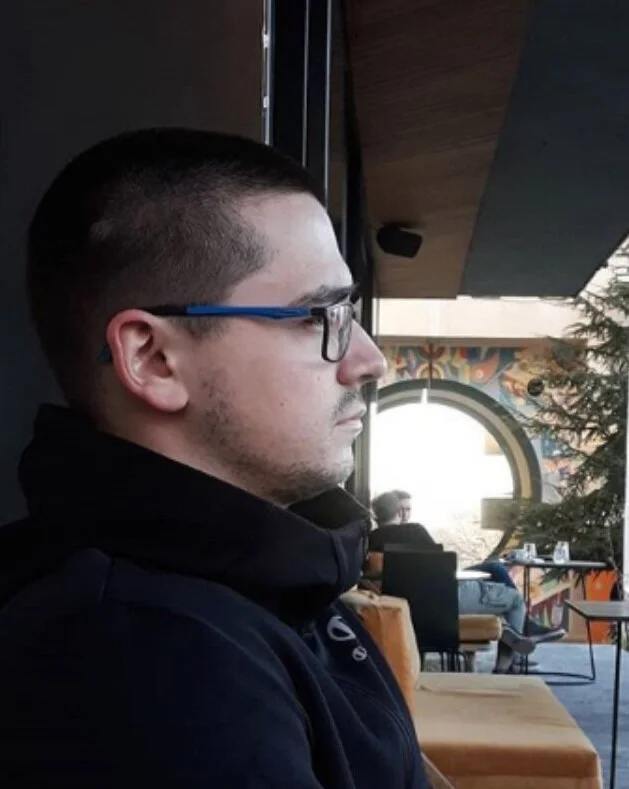
DANIEL (23)
Belgrade, Serbia
Senior @ College for Sport Management
His girlfriend is a full - time student, too, and they don’t have much time to meet during the semester, so they love spending vacations together
Runs a YouTube fitness channel & promotes a healthy and active lifestyle
“Eat like a local, drink like a local, think like a local”
Goals and needs
Daniel travels with his girlfriend around Europe whenever they can, usually once per month
They like to explore new places and learn about historical and cultural heritage
They think places for tourists are usually overrated, and they try to connect with locals and get their recommendations
Motivations
Daniel wants to explore the world, but as a student, he has to stay on a budget
He thinks touristy places can be pricey and overrated
Wants to spend quality time with his girlfriend and have memorable experiences
Often posts on Social media
Eats healthy, and avoids processed food
Frustrations
Daniel is concerned about the conformity of millennials, their poor lifestyle choices, and junk food addiction
He believes he can't get to his full potential if he doesn’t move, and he often thinks about leaving the country and starting a nomadic lifestyle.

MEGHAN (35)
Lives in Vienna, Austria
PR manager @ auto company
Happily married to Thomas (36), with whom she has a daughter Sofia (5)
She enjoys spending quality time with the family. Loves to travel and read books, and thinks of them as life necessities
“Sometimes I feel like I need a personal assistance for all the work I have to get done”
Goals and needs
Weekend getaways with her family and romantic weekends with her husband so she can relax and enjoy their time together
The family likes to take road trips and explore new places
At least once a year, they travel abroad with extended family and friends
Motivations
Wants everyone to enjoy and have fun
Thomas and Meghan care about Sofia’s growth and development, so put her needs first
As a busy businesswoman, Meghan often feels like she doesn’t have time for herself, so stealing a bit of family time for “her time” won’t harm
Frustrations
Relies on Thomas a lot; he is her biggest ally, but she gets sad because they don’t have more time for each other as they used to
She usually doesn’t have a lot of time to organize family trips even though they are usually short
Not a lot of places they visit as a family are kids-friendly
User Stories
USER INFORMATION (examples)
As a new user, I want to select my preferences so that my scavenger hunt can be as personalized as possible
As a Scavenger hunt newbie, I want to have a guide available so that I can do the hunt anytime I want
As a Scavenger hunt newbie, I want to have an option to choose my hunt pace so I know I have enough time to finish it
As an experienced Scavenger hunt goer, I want to have an option to save my experiences so that I can share them with friends and family
THE GAME (examples)
As someone who started a scavenger hunt, I want to have an option to save progress so that I can take short breaks and continue where I left off.
As a user who finished a few scavenger hunts, I want to have access to a dashboard with all my accomplishments, so I can follow my progress and save places I visited.
As a new user, I want to have access to a free trial game so that I can decide whether or not I want to create more scavenger hunts.
As someone who doesn’t always understand a quest, I want to have an option to get a hint for my challenges in case I get stuck so that I can still have a chance to finish on time.
Read more User Stories ➡️ here
User Flows
Main USER FLOW
open the app
chose to create an account
enter email address
confirm the input
get redirected to the mailbox
confirm the email address via magic link
get redirected to the app
app's home page
Meghan recently found out about My Citi Hunt, and she is very excited to see how it works. First, she downloads the app and creates the user account.
Objective: Create a user profile by using an email address for verification
Entry point: Home page
Success Criteria: Active profile and return to the Home page
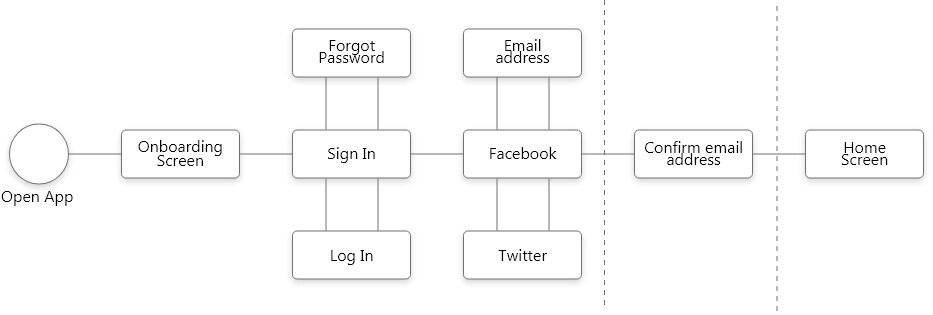
Sign up User flow
Main user flow
open the game creator
choose the city
choose the interests
set the date and time
set number of players
set the accessibility features (optional)
start the game
After signing up, it is time to create the first scavenger hunt
Objective: Set up the game preference, and access the game
Entry point: Access the game creator
Success criteria: Start the game
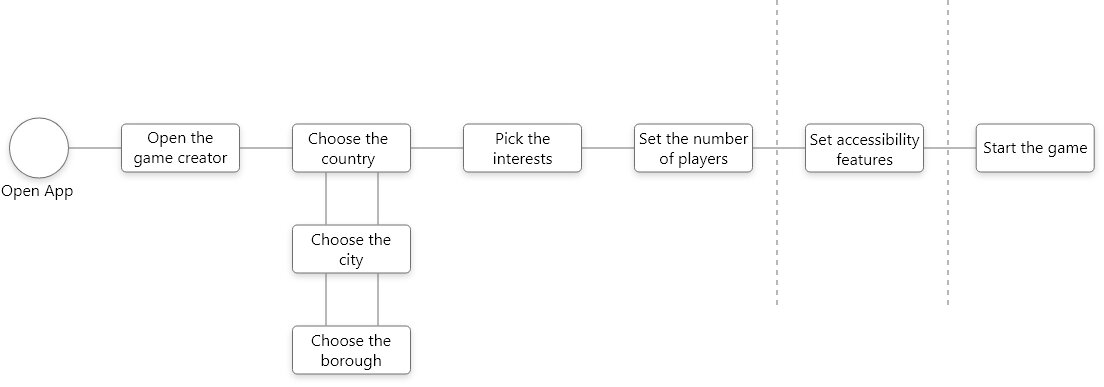
Start the game User Flow
Main User Flow
open previously created scavenger hunt game
follow instructions, solve quests and take photos/videos as the part of the challenge
successfully finish the scavenger hunt
choose option to post photo(s)/ video(s) on social networks
choose Facebook as social network to share photo(s)/ videos(s)
After finishing the hunt, Daniel wants to share photos and videos he took along the way with his friends on social networks.
Objective: Daniel wants to share his scavenger hunt experience on social networks
Entry Point: Opening previously created a scavenger hunt
Success criteria: Posting a photo(s)/ video(s) through My Citi Hunt directly on Daniel’s Facebook page

Social Media Post User Flow
Card Sorting & Resulting Sitemap
GENERAL PROJECT INFORMATION
A total of 6 participants gave their opinion on how the sitemap should be organized. Before they started with the sorting, they were informed through the Optimal Workshop messaging system what the project is about, the purpose of the research, and that there are no right or wrong answers.
Before entering the card sorting environment online, test participants had to answer two questions:
“Have you ever gone on a scavenger hunt before” from which we learned that just 2 out of 6 participants participated in a scavenger hunt before
“Have you ever used a travel app before? If so, could you remember the name of it”? and 4 out of 6 said they have used travel apps before; HereWeGo, Booking, and Airbnb were their answers.
Card Sorting Results
The Best Merge method looks much like the original sitemap, but some of the changes were mind-opening. For example, one of them is that a Gallery category should be transferred from the Profile group to Live Feed.
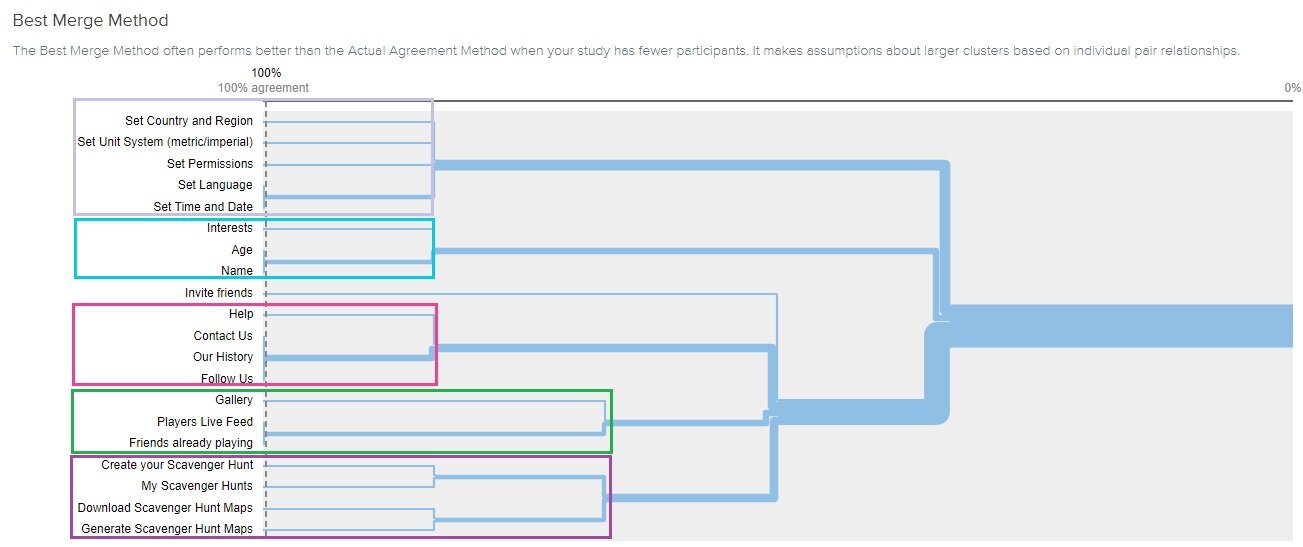
Best Merge Method
Thanks to Card sorting research, we learned about the importance of informing test participants about what their task is and how the results will help my project grow.
During the research, participants weren’t sure where to sort certain categories, however, because of the nature of the product, we couldn’t reveal or provide suggestions about the features planned to develop for this app. That is why some categories ended up being unsorted, such as the Help or Invite friends categories
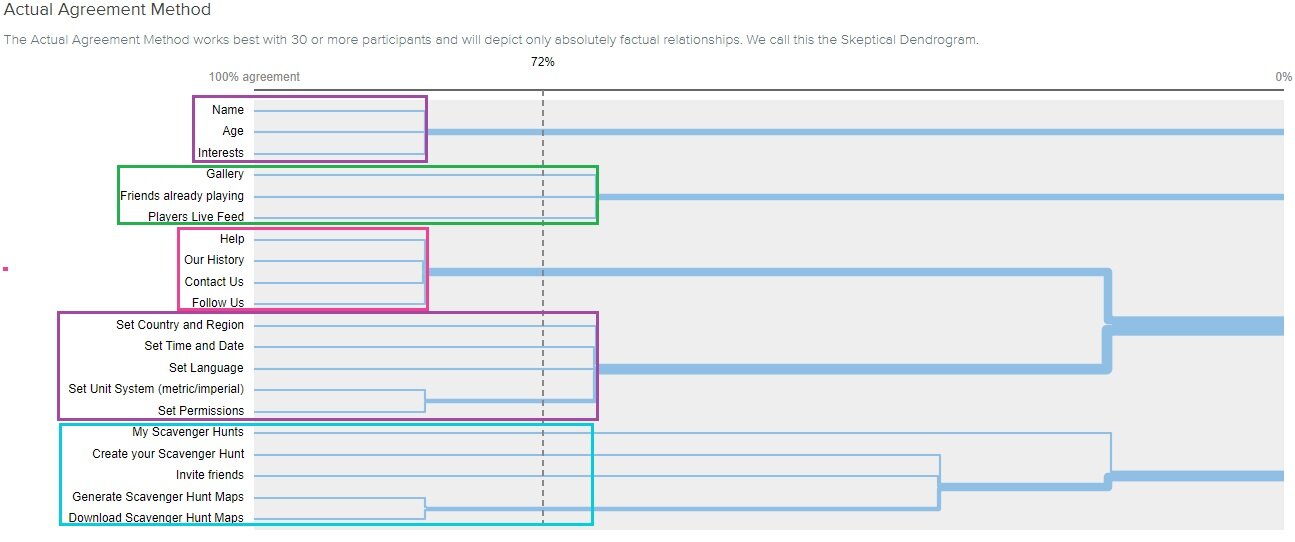
Actual Agreement Method
The final version of the Sitemap shows the simplicity of the game. Navigation is not cluttered with options, so it allows easy access to wanted features.

Usability Testing
USABILITY TEST PLAN - METHODOLOGY
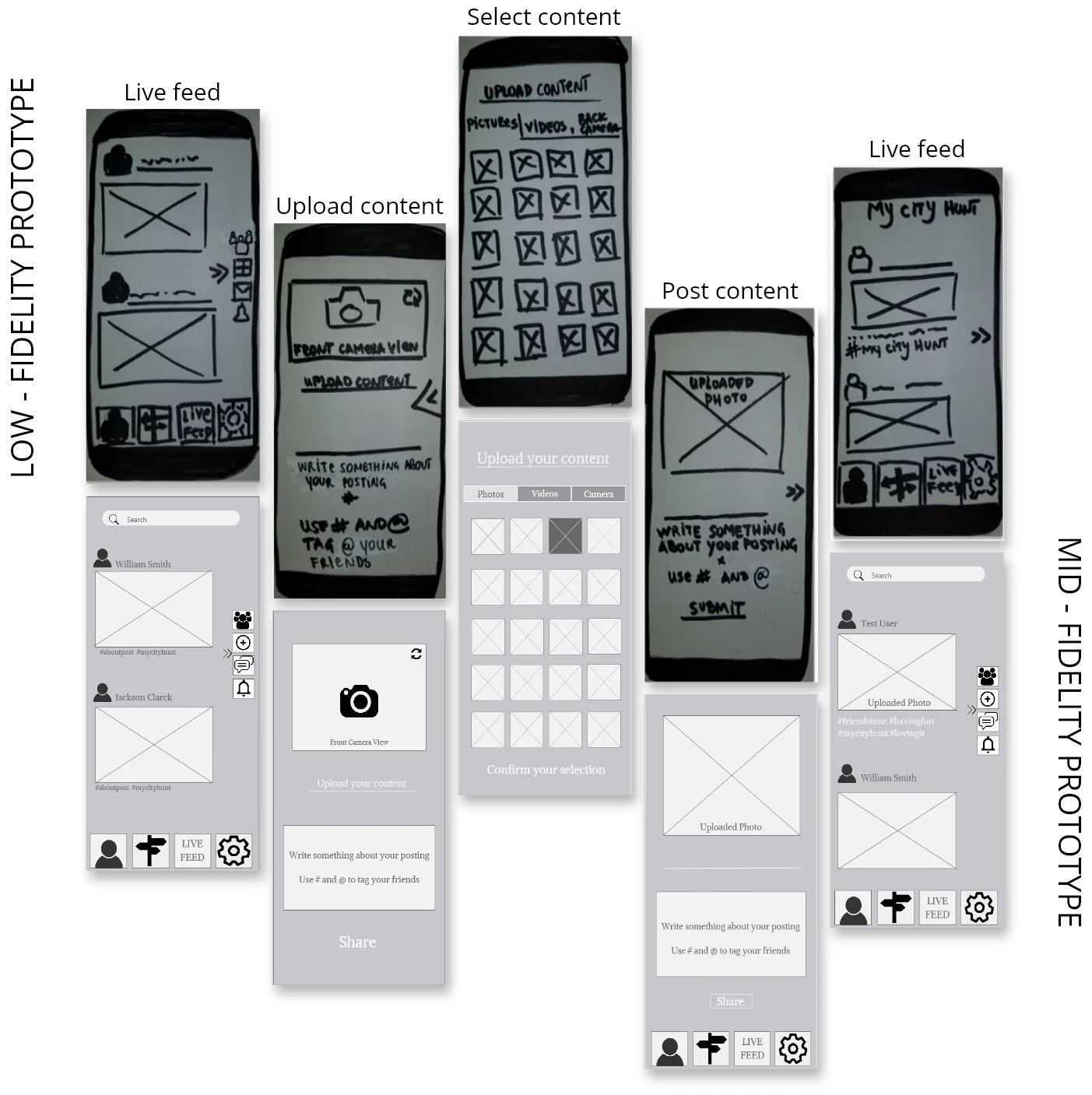
After creating an initial sitemap and developing low & mid-fidelity mockups of the web app, it was time to take our design to the next level. We organized the first round of Usability testing and the primary goal was to receive feedback from potential end-users. The usability testing was moderated and held in-person and remotely via Google Meets.
PARTICIPANTS & SCHEDULE
A total of 6 people participated in usability testing. For detailed information about their demographics and testing schedule, please contact me directly.
TEST SCRIPT
The usability test script used during the prototype testing contained Introduction, General Personal Questions, open-ended questions related to participants’ previous experience, and direct hands-on tasks. For detailed information, please contact me directly.
TEST OBJECTIVES
Learn do participants understand the basic navigational structure and how they interact with available features
Lean do participants understand basic user flows: sign up, interests update, and content upload
As a moderator and interviewer, I observed participants’ behavior during the study and encourage them to speak their thoughts. Also, I observed their body language and thumb movement while interacting with the prototype to help us make conclusions about element positioning.
GOALS
Learn how well users understand the app’s basic functionality, features, navigation structure, and overall value and service the app provides
Test usability, efficiency, and satisfaction of the app and discover errors
Learn about what test participants think about the project, their preferences, their satisfaction with this basic product
Discovered Errors

Issue No. 1
My Citi Hunt icon doesn't represent its function
EVIDENCE
4 out of 6 test participants did not realize what the road signs icon represents. They knew it was related to the map or a trip, but none of the four participants that mentioned it actually understood what it could do and what it represented.
SOLUTION
The current layout, with buttons in the footer, will be replaced with the hamburger menu, as it doesn’t block the page view.
Instead of icons, we will use words to describe the functionality.

Issue No. 2
The option to share uploaded content on other social media is missing
EVIDENCE
3 out of 6 participants noticed that a specific function was missing, and they would like to see and use that option
SOLUTION
The option will be created, and it will allow users to share uploaded content on other social media, such as Facebook and Instagram.

Issue No. 3
Add Content button doesn’t represent its function
EVIDENCE
2 out of 6 participants did not understand what Add Content button represents, and the other 4 participants admitted they had trouble figuring out what that button does, but they relied on their logic to make a conclusion.
SOLUTION
Based on the suggestions, the Camera button will replace Add content button, which most of the test participants prefer. The button will always be present but minimized, so it allows a smooth interaction with other elements.
Final Prototype
For defining UI elements, I followed Material Design recommendations and Design for Accessibility guidelines and tested users' feedback. I kept the design simple and made it even more engaging. Two main features are promoted – the Home page Live feed containing users' posts (only publicly shared ones) and the option to Create a personalized scavenger hunt.
UI Library segments are available ➡️ here

Onboarding
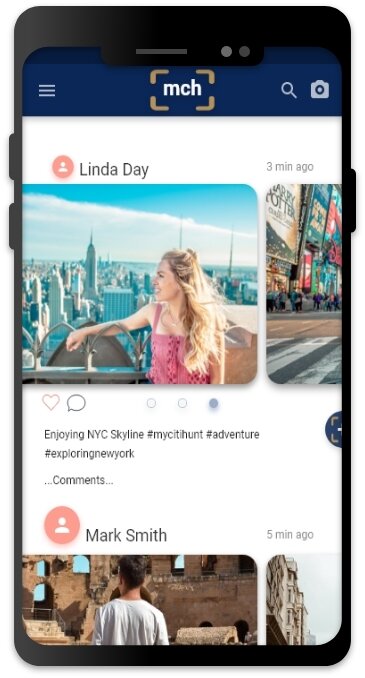
Homepage

Choose interests